 TimeFence
TimeFence — website blocker with daily time limits
Block distracting sites or give them a daily time budget. Focus schedules, Strict Mode. No account, no tracking, one-time Pro.
Add to Chrome — free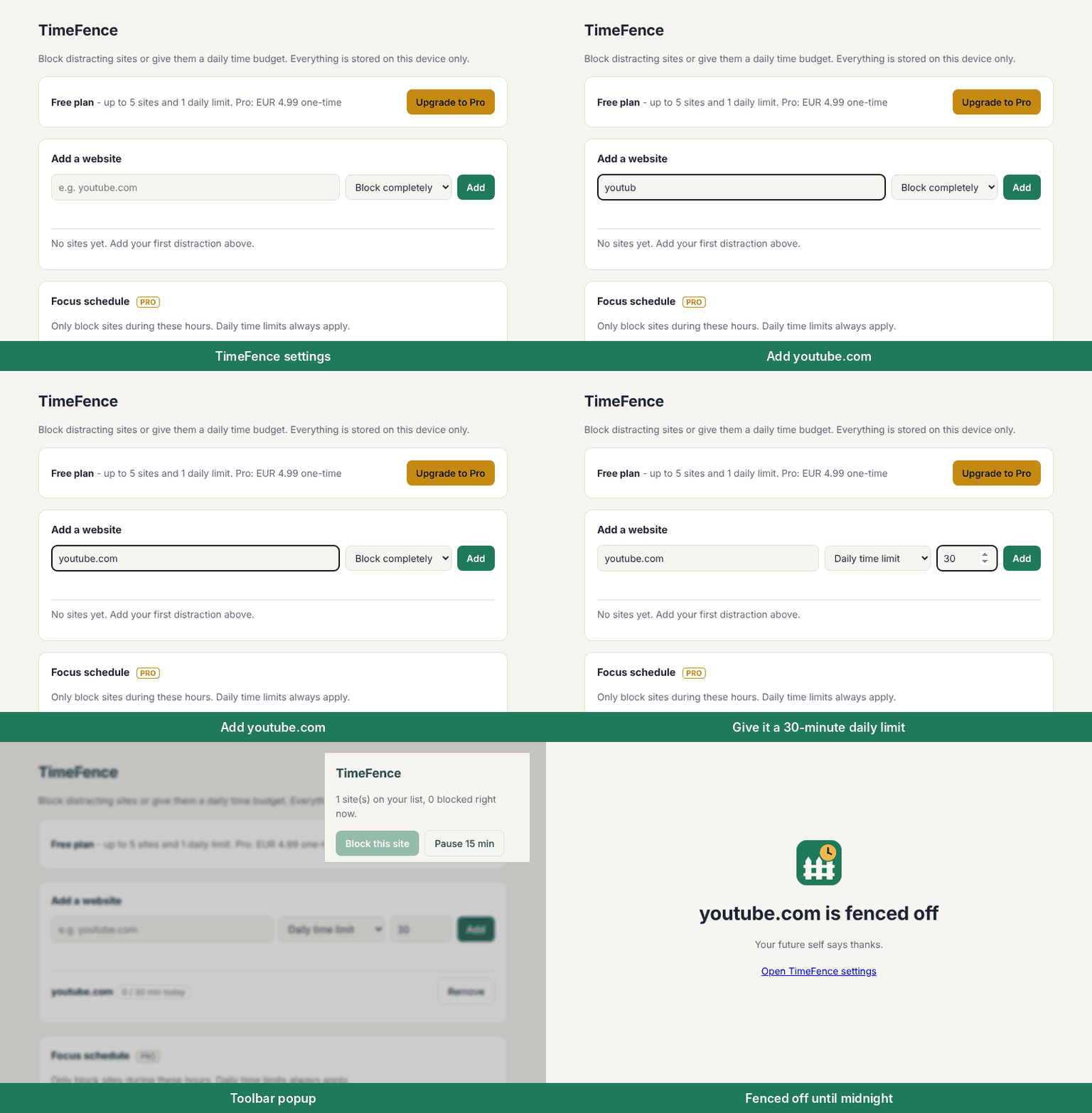
Free forever
- Block up to 5 websites with one click (includes subdomains, so m.youtube.com counts as youtube.com)
- 1 daily time limit, e.g. "YouTube: 30 minutes a day". When the time runs out, the site is fenced off until midnight
- Time only counts while you are actively using the tab
- "Block this site" button right in the toolbar
- 15-minute pause when you really need it
- Calm block page, with no guilt-tripping and no ads
TimeFence Pro, one-time payment
- No subscription
- Unlimited blocked sites
- Unlimited daily time limits
- Focus schedules: block only during work hours, on the days you choose (overnight windows supported)
- Strict Mode: you cannot remove sites or pause while a block is active
Private by design
TimeFence has no servers, no accounts and no analytics. Your list and usage minutes stay in your browser's local storage. Blocking uses Chrome's built-in declarativeNetRequest engine, so it is fast and light.
Why the permissions?
- "Read and change all your data on websites": needed to redirect a blocked site to the TimeFence block page and to see which site is in the active tab for time limits. TimeFence never reads page content.
- Storage: saves your settings locally.
- Alarms and Idle: count time on limited sites once a minute, but only when you are active.
How it compares
| TimeFence | StayFocusd | BlockSite | LeechBlock NG | |
|---|---|---|---|---|
| Daily time limits | Yes, minutes per site per day (1 limit free, unlimited in Pro) | Restricts time on sites; per-day detail not stated in listing | Yes, "Usage Limit": daily cap, then blocked for the rest of the day | Time limit per period you set (listing example: 10 min every hour) |
| Schedules | Yes (Pro), chosen days and hours, overnight windows | Yes, active days and hours | Yes, days and times | Yes, up to 30 site sets with their own times and days |
| Strict mode | Yes (Pro): no removing sites or pausing during a block | "Nuclear Option": cannot be cancelled once on | Password protection for settings; no strict mode named | Lockdown; password or access code for options |
| Account required | No | — | — | — |
| Tracking / analytics | None; declares no data collected | Usage history and AI-chat analytics; declares web history, user activity and page content collected | "Insights" on browsing trends; declares web history collected | None stated; developer says it will not collect or use your data |
| Pricing model | Free; Pro is a one-time payment | — | Free; Premium offered (price not listed) | Free |
Compared on 21 Oct 2026 from each extension's store listing (BlockSite pricing from blocksite.co). "—" means the listing does not say.
FAQ
Is there a website blocker with a daily time limit instead of a full block?
Yes. In TimeFence you add a site, choose "Daily time limit" and set the minutes, for example YouTube for 30 minutes a day. Time only counts while you are actively using that tab. When the minutes run out, the site is fenced off until midnight. The free version includes one daily limit; Pro has no limit on how many.
Can I block websites without creating an account?
Yes. TimeFence has no accounts and no servers. You install it from the Chrome Web Store and add sites straight away. Your list and your minutes are kept in your browser's local storage.
Is TimeFence a StayFocusd alternative?
It covers the same core job: limiting time on distracting sites, blocking them during set hours and locking settings while a block is active (Strict Mode, in Pro). The differences are in the table above: no account, no browsing analytics, and Pro is a one-time payment rather than a subscription.
Does TimeFence track my browsing?
No. It has no analytics, no servers and no ads, and it collects no user data. To count time it checks which site is in the active tab once a minute, and that count stays on your device. It never reads page content.
What happens when I hit the limit or want a break?
The site redirects to a calm block page until midnight. On the free plan you can pause blocking for 15 minutes. With Strict Mode on (Pro), you cannot pause or remove sites while a block is active.